See who’s bidding against you on ChatGPT: Start your free trial today
See every brand advertising on your ChatGPT prompts, in an account you set up yourself in minutes.
AIChatGPT
TL;DR
Adthena’s ChatGPT competitor ad tracking is now self-serve. Sign up with a work email, confirm your domain and you’ll see every brand advertising on your tracked ChatGPT prompts, with no sales call. ChatGPT Ads Manager only reports on your own ads. Adthena shows your presence rate, your share against your top five competitors, every competitor ad word for word, how stale your copy is and the prompts you’re missing. The trial is free for 21 days with no credit card, then $399 USD a month. Your landscape opens immediately and your prompt data fills in within 72 hours.
Published by Serra BensteadNovember 09, 2026
ChatGPT's reporting stops at your own ads
Open ChatGPT Ads Manager and you’ll find impressions and clicks for your campaigns. Everyone else bidding on the same prompts stays invisible.
That matters more than it sounds. A single prompt like “best cordless drill for home projects” can carry ads from dozens of brands. Ads Manager reports on one of them.
So share of voice becomes a guess. Competitor headlines go unread, which means you have nothing to benchmark your copy against. And the prompts sitting outside your own list stay dark, even though that’s exactly where a competitor can build a lead before you notice.
Until now, getting access to ChatGPT Ads Intelligence meant a sales conversation. Today you can set up an account yourself and see your market the same afternoon.
Five views give you one picture of the ChatGPT ads market
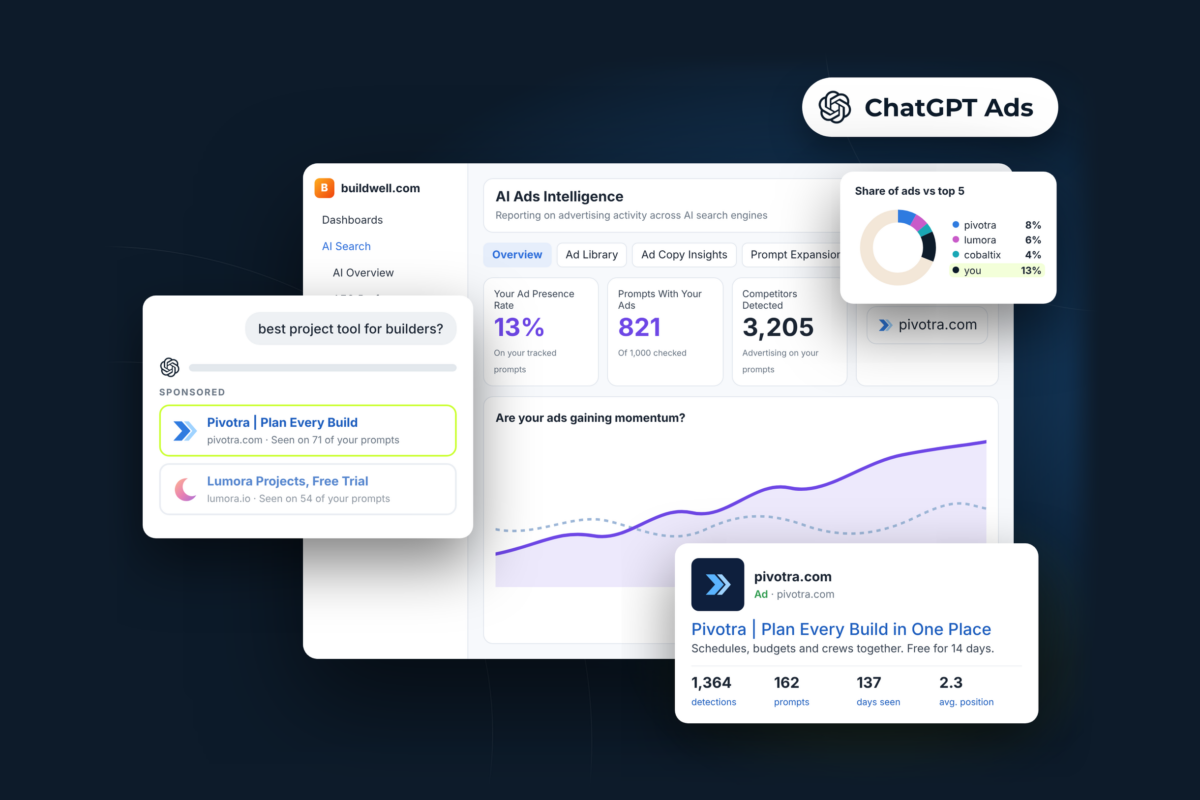
Everything inside ChatGPT Ads Intelligence sits in five views, and each one answers a different question about the auction you’re bidding in. The screenshots below use a fictional home improvement retailer, buildwell.com, with illustrative data.
Ad presence and momentum
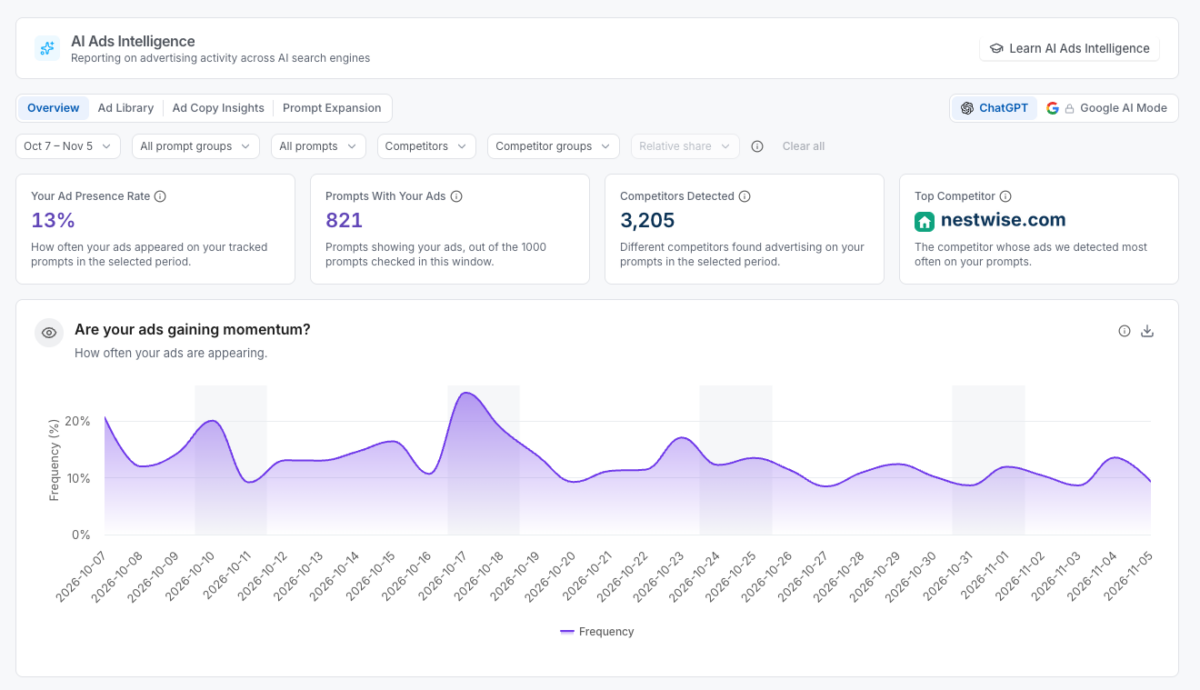
Your Ad Presence Rate shows how often your ads appeared across your tracked prompts. Next to it you get the number of prompts carrying your ads, how many competitors were detected and who your top competitor is.
The daily trend underneath answers the question most teams ask in their first month: are your ads gaining ground? In the example, buildwell.com’s ads appear in 13% of checks and on 821 of the 1,000 prompts checked. 3,205 competitors advertise on the same set, and nestwise.com shows up most often.
Share of ads vs your top five
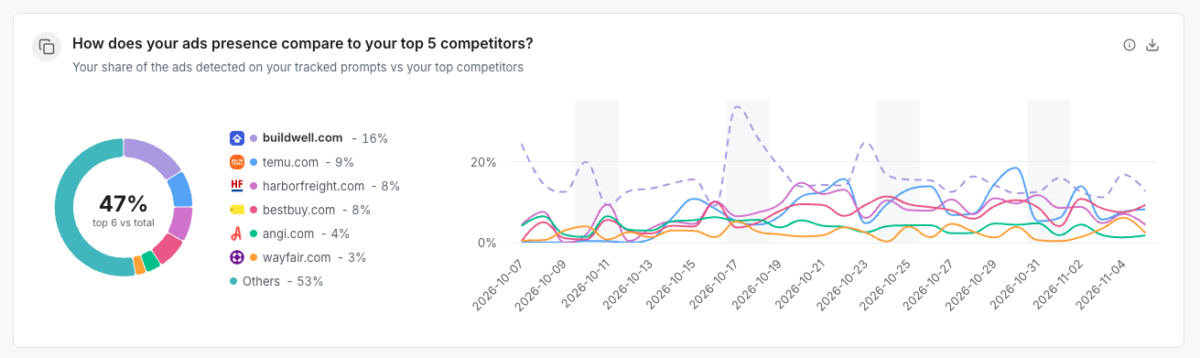
Presence tells you whether you show up. Share tells you how you compare. This view sets your share of the ads on your tracked prompts against your five biggest competitors, then tracks it day by day so you can see exactly when you gain ground and when you lose it.
In the example, buildwell.com holds 16% of the ads on its tracked prompts, ahead of temu.com on 9% and harborfreight.com on 8%. Its top five competitors and the brand itself account for 47% of all ads detected, which leaves more than half the market spread across everyone else.
Ad Library
Every ad observed on your tracked prompts, captured word for word. Each one shows how often it was detected, how many prompts it ran on, how long it has been live and its average position, with new ads flagged as they appear. You can filter to your own ads or your competitors’.
Ad Copy Insights
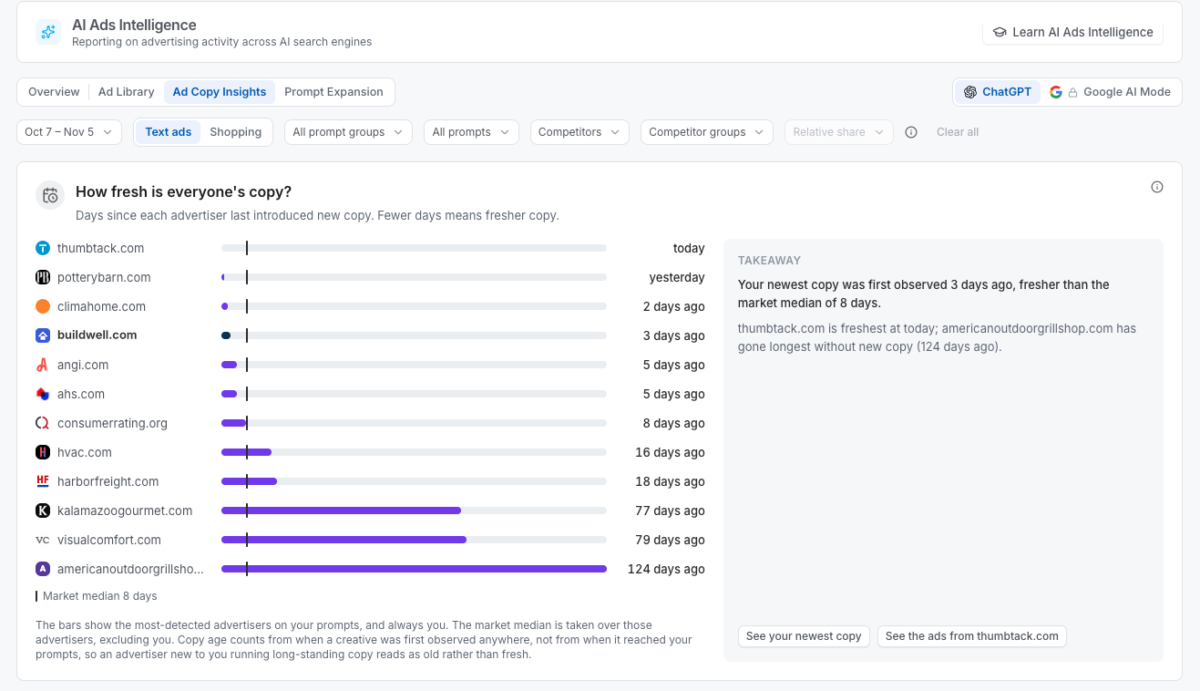
Here you see how fresh everyone’s copy is, which messages advertisers lean on and where their ads send people. Every chart comes with a plain-English takeaway, so you know what to change without building the analysis yourself.
In the example, buildwell.com’s newest copy was first seen three days ago, fresher than the market median of eight. At the other end, americanoutdoorgrillshop.com hasn’t introduced new copy in 124 days.
Prompt Expansion and gaps
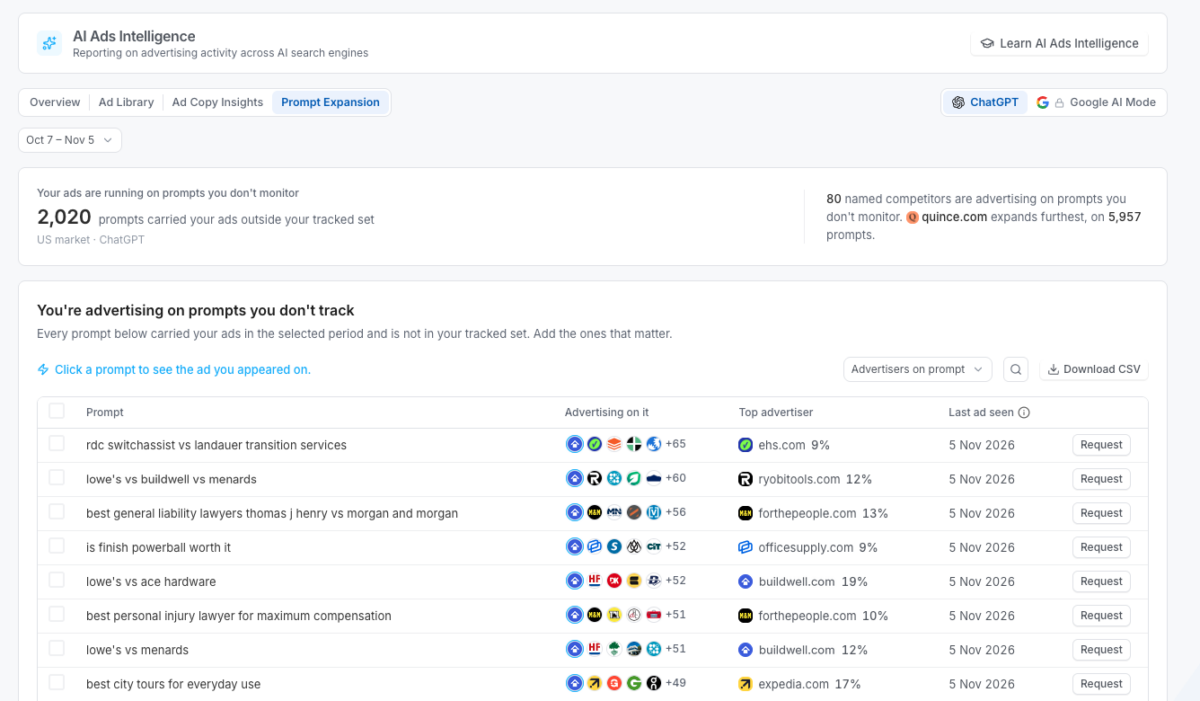
This view finds the prompts carrying your ads outside your tracked set, and shows how far competitors are advertising on prompts you don’t monitor. Pick the ones that matter and bring them into your tracking.
In the example, buildwell.com’s ads ran on 2,020 prompts it doesn’t track. Meanwhile, 80 named competitors are advertising on prompts outside its list.
You can be live in minutes, with no sales call
There’s no approval queue and nobody to schedule a call with. You run the whole setup from the app.
Sign up (about a minute). Enter your work email and the six-digit code we send you.
Confirm your domain (a few minutes). We suggest topics, prompts and competitors based on your domain. Keep what fits and add anything we missed.
Go live (within 72 hours). Your AI Ads Landscape opens straight away, and a countdown in the app shows when your own prompt data will be fully populated.
Decide (day 21). Nothing is charged unless you add a card. After that it’s $399 USD a month with no setup fees.
Once you’re in, we run up to 200 tracked prompts through ChatGPT on rolling checks. Every ad we see gets logged with the advertiser, the landing page, the copy itself and the prompt it ran on, and that feeds the share calculations across all five views.
Agent Arlo turns the data into your next move
Agent Arlo, ouragentic AI analyst, answers questions about your ChatGPT ads data in plain English. Type in which competitor gained most on your prompts this week, and Arlo will tell you that nestwise.com now shows on four more of your prompts and that its newest ad leads on price. From that answer you can jump straight to their ads or compare their copy with yours.
The trial runs on the same data our customers use
The self-serve account sits on the same data layer as every Adthena customer. We monitor over 300,000 prompts a day, and between July and September 2026 we tracked 15.2 million ChatGPT ad placements across 20 markets, from the US, UK and Australia to South Korea and Brazil. Underneath sit our patented Whole Market View™ technology and over 14 years of labelled paid search data.
“Most advertisers going into ChatGPT have no idea who they’re up against. Making this self-serve means any team can see their market the same day they decide to look.” Ashley Fletcher, CMO, Adthena
Get ahead of your category while it’s early
Most advertisers on ChatGPT still can’t see who they’re bidding against. The ones who can are already tightening their prompt lists and refreshing copy while competitors wait on their own reports.