The Google Ads bidding change takes back the efficiency your account found

MCP is how AI agents get to live data. Here's what Adthena's looks like in practice.

google ads bidding change blog

TL;DR

From August 17, 2026, Google Ads’ bidding change means budget-limited campaigns on Target CPA or Target ROAS will deliver at the target you set, not the better number Smart Bidding has been finding on its own. If your campaigns have quietly been beating their targets, that efficiency drifts away unless you act. Review affected campaigns now and use the Bid Target Adjustment Tool (live since July 6) to lower targets, switch strategy, or raise budget. Then go find the efficiency Google stopped hunting for you: it lives in competitor gaps, not account settings.

Published by Joss Froggatt July 20, 2026

There’s a quiet win most paid search managers know well. You set a target CPA of $10, and over a few months Smart Bidding settles the account at $5. Efficiency the algorithm found, and you kept. From August 17, 2026, that quiet win goes away.

Google is changing how target-based bid strategies behave on campaigns that are limited by budget. The stated goal is more consistent, predictable performance against the target you set. The practical effect is narrower than that sounds, and it matters most for anyone running lean.

What's actually changing

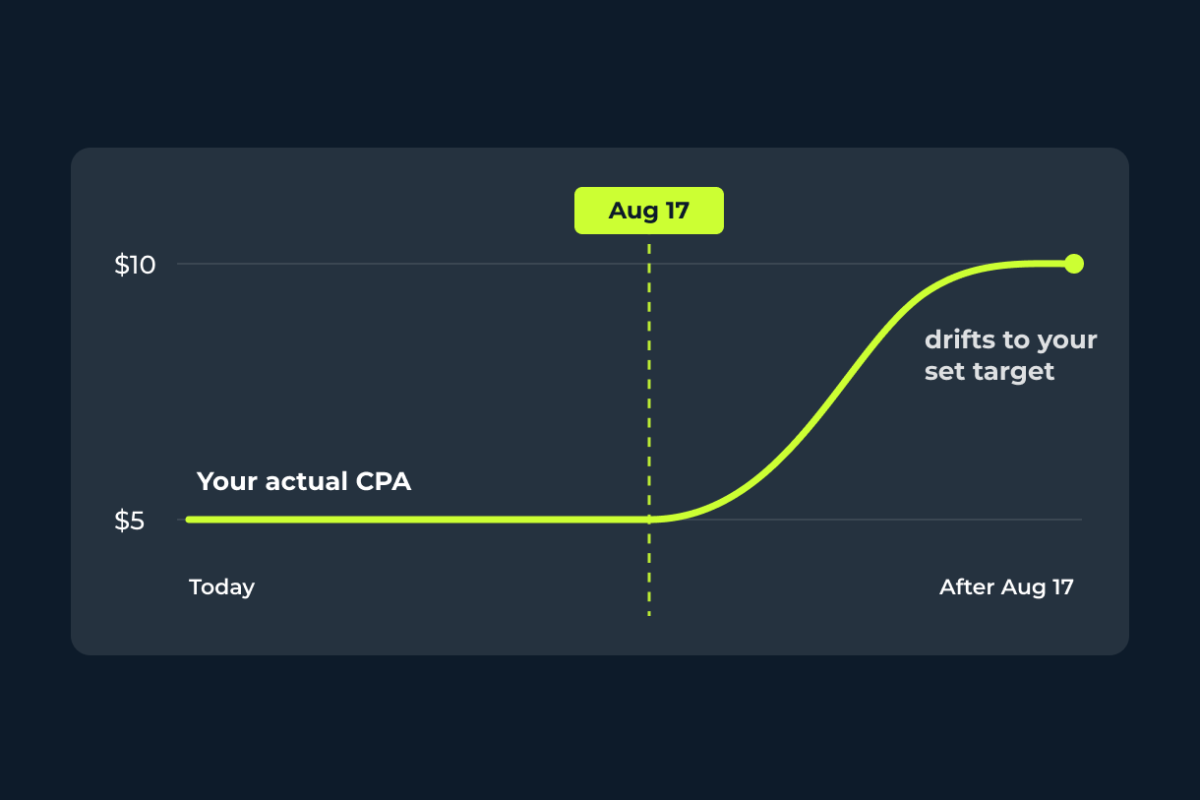
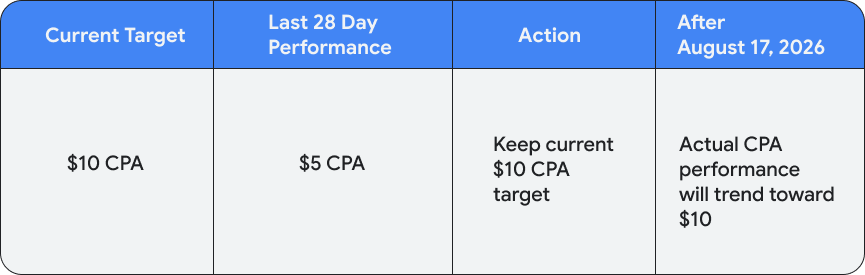
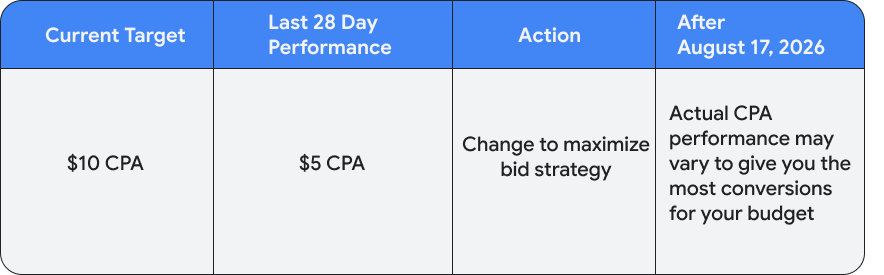
Today, a budget-limited campaign on Target CPA or Target ROAS can beat its target and swing around when you move budgets. After August 17, those campaigns will optimize more consistently toward the exact target you entered, even as budgets change. Google’s own example is blunt: a campaign with a $10 target CPA that’s been delivering a $5 CPA will start delivering closer to $10.

Google Ads bidding change table 1

To manage the shift, Google rolled out a Bid Target Adjustment Tool on July 6, where you can review recent performance and apply new targets. Notifications go to any advertiser with a campaign that was limited by budget in the last 12 months on an affected strategy. The change covers Search, Shopping, Performance Max, Demand Gen, and Travel. App, Video reach and Video view campaigns keep their current behavior. Display and Hotel campaigns are already using this tighter bidding behavior.

Why this has PPC managers annoyed

The reaction across the paid search community has been sharp, and the reasoning holds up. A loose target was never sloppy. It was strategy. Setting a target above your true goal gave Smart Bidding room to explore, test new audiences and surface conversions that came in cheaper over time. This update closes that room unless you act. And since almost every account is limited by budget at some point, the reach is wide.

Read plainly, the change points advertisers toward a single answer when performance tightens: raise the budget. That may suit Google. It does not automatically suit you.

So why has Google made this change? The answer lies in their engineering logic, which enables predictable scaling. Historically if you added more budget to a campaign already beating its target, your CPA might skyrocket unpredictably. Google’s reasoning here is to make the target a strict anchor, so when you do scale budget, performance is predictable.

What to do before August 17

Don’t wait for the drift. Review every campaign flagged as limited by budget on a target-based strategy, then decide, campaign by campaign:

  • Keep the target and accept performance moving toward it. That is fine if the target already reflects your real goal.
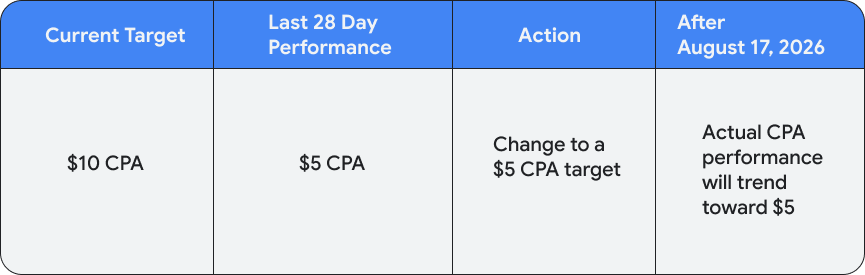
  • Lower the target to your recent actual performance to hold the efficiency you already have.

Google Ads bidding change table 2

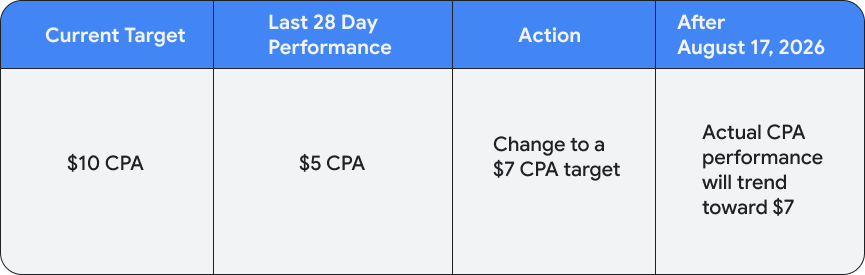
  • Set a custom target that matches your margin, somewhere between the two.

Google Ads bidding change table 3

  • Switch to Maximize Conversions or Maximize Conversion Value, which chase volume with no target, though your CPA and ROAS will float.

Google Ads bidding change table 4

  • Raise the budget, but only where the unit economics genuinely support scaling.

Use the Bid Target Adjustment Tool to apply changes quickly. Google won’t adjust your targets for you.

The part most of the noise misses

Strip away the frustration and one fact remains: Smart Bidding was doing discovery work on your behalf. It hunted for the pockets where conversions came in below your target, and it quietly moved budget toward them. Take that away, and the hunting becomes your job again.

So where do those pockets actually live? Not inside your own account. Your account only sees your own auctions and your own history. The efficiency has always sat in the gaps around you: the terms competitors ignore, the categories where rivals overpay, the demand sitting behind thin coverage. Finding it is a competitive intelligence problem, not an account-settings one.

How to find the efficiency manually

Adthena’s Whole Market View™ shows you the full field of advertisers on your terms, not the sliver Google reports back inside your account. You see where competitors cluster and, more usefully, where they’re absent.

From there the efficiency gets concrete. Spot the whitespace: terms and categories with real commercial intent and low competitive density, where the cost to win is lower and Smart Bidding used to drift on its own. Read competitor coverage and pricing signals to see where you’re overpaying to defend ground you could concede, and where a cheaper flank sits open. Then move the budget there deliberately, the way the algorithm used to do quietly.

One practical note: you can reach the data however your team works, through the app, the API, or the Adthena MCP server.

Google moved the efficiency, not killed it

What used to surface automatically now has to be found on purpose. The advertisers who treat August 17 as a prompt to look outside their own account, rather than a nudge to spend more inside it, are the ones who’ll keep their edge.

See where the whitespace is in your market.

Related content